

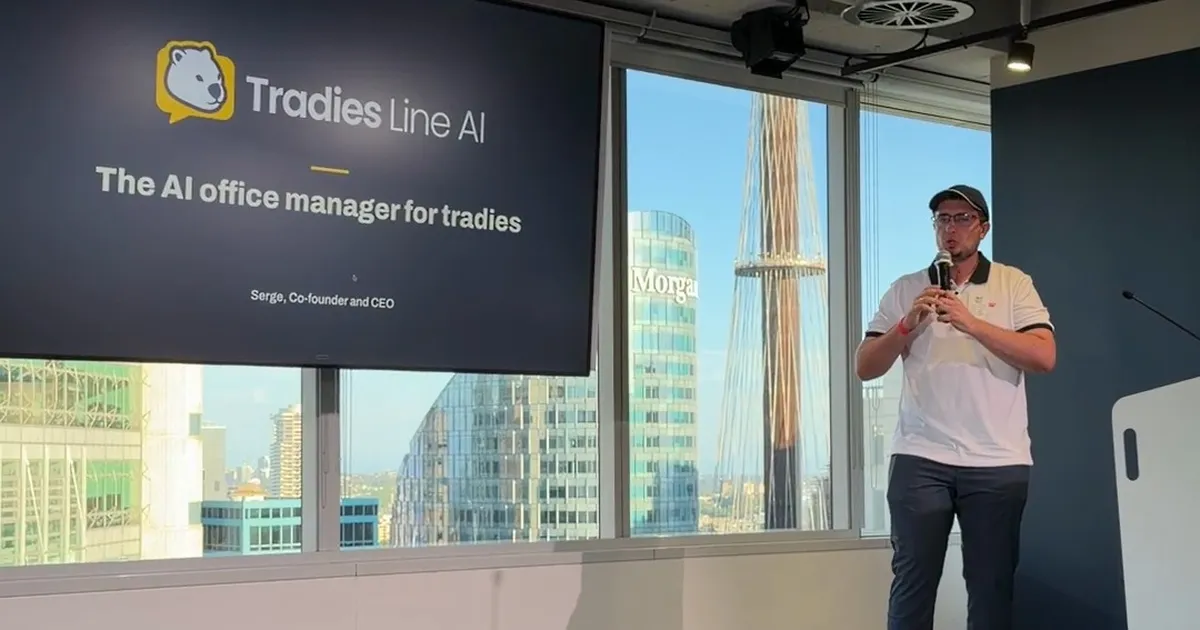
At Atlassian for Startups Demo Night in Sydney, we followed one made-up plumbing job from the first call to the paid invoice. Here is what each step does in Tradies Line AI.
Atlassian for Startups Demo Night was held in person at 363 George St, Sydney, on Wednesday 4 November 2026. Serge Chyzhyk, our co-founder and CEO, gave one of the five demos, following one made-up plumbing job from the first call to the paid invoice.
Each demo ran about 3 minutes, followed by 2 minutes of questions from the audience. This post walks through the same job, one step at a time, so you can see what each part of Tradies Line AI does.
What did Tradies Line AI show at Atlassian for Startups Demo Night?
Serge showed Tradies Line AI, the AI office for trades businesses. The demo had four steps:
The call answered and booked.
AI quoting building the whole quote from a voice note recorded on site.
The invoice with a pay link.
Wombo, the AI office manager.
The plumbing job was made up for the demo. It was not a real customer.
Below, each step gets a plain paragraph on what that part does today. Those paragraphs describe the product as it ships, not anything said on the night.
What happened when the plumbing job's first call came in?
In the demo, the call was answered and booked. That is the job of the AI receptionist, one of the AI staff in Tradies Line AI.
You keep the number your customers already ring. You set your mobile to forward the calls you miss, using your carrier's code. The call forwarding guide has the codes for each Australian and New Zealand carrier.
The AI receptionist answers in your business name, day or night. It speaks Australian English, or New Zealand English for NZ businesses. It finds out what the job is and which suburb.
With booking on, it puts the job in your calendar. Then it texts the customer a confirmation from your plan's texts.
It answers calls in parallel, so the next caller never hits a busy tone or voicemail. Urgent jobs are texted to you while the caller is still on the line. That needs your number verified and texts left on your plan.
On a paid plan it can give a guide price from your price list if asked. It never commits you to a firm price. If a caller asks whether it's a person, it says straight away that it is an AI.
Every call is recorded, and the caller is told so. You get a transcript and a summary on the job. If you want the case for answering every call, read what actually happens when you miss a call.
How did AI quoting build the quote from one voice note on site?
In the demo, AI quoting built the whole quote from a voice note recorded on site. Here is how AI quoting works.
On site, you record a voice note in any language. You can add photos and plans as well. Then you tap Draft quote with AI.
It writes the scope of works and every line, with quantities. Prices come from your own price list. Every line names the note it came from, and tapping the name opens that note.
The AI doesn't guess prices. If an item isn't on your list, the price comes back empty for you to fill in. A labour figure you weren't sure of comes back flagged for you to set.
Capture still works without phone signal. Your notes and photos send when you're back in range, and the quote is built then.
Who sends the quote
You do. AI builds the quote, and you check it and send it. Quotes are legal documents, so that approval step is deliberate.
The customer gets an email link and opens it on their phone. To accept, they type their full name and tick a box. You see who accepted and when.
On a yes, the quote becomes a job at Quoted, ready for you to book in. Nothing is scheduled for you. With follow-ups on, the customer gets reminder emails before the quote expires, and a text the day before where texting is available.
How did the invoice and pay link get the job paid?
In the demo, the invoice went out with a pay link. AI invoicing turns the finished job into a draft invoice with that link. You check it and send it by email.
With Tradies Line Pay on, the customer pays by card, Apple Pay or Google Pay. Afterpay or Klarna work where available. The money lands in your own account, less the fees in our terms.
When the customer pays, the invoice marks itself paid. With Xero connected, a copy syncs there for your books.
If they don't pay on time
Turn reminders on and AI invoicing sends 3 emails, then 2 texts and up to 5 short AI calls once Tradies Line Pay is connected. The emails go on the due date, then three and seven days later. The calls run on weekdays and text the pay link.
The texts and calls come out of your plan's allowance. Chasing stops the moment the customer pays. You can switch it off for any single invoice.
If you use Xero, turn off Xero's own reminders so the customer isn't chased twice. For the human side of chasing, see how to chase an unpaid invoice and keep the customer.
What does Wombo, the AI office manager, do in between?
Wombo was the last step in the demo. Wombo is the AI office manager you type or talk to, from any page of the dashboard, on your phone or computer.
Ask Wombo "who owes me money?" and you get your overdue invoices. Ask for a quote on a callout and a mixer tap, and Wombo drafts it from your price list. Wombo also finds any job, quote, invoice or customer, and updates jobs, customers and prices.
On paid plans, Wombo reads and replies to customer messages in your business name. That covers texts (two-way, Australia), website chat, WhatsApp, Messenger and Instagram. Wombo books the job when booking is on and flags anything urgent to you.
What Wombo never does alone
Wombo never sends a quote or invoice, and never moves money. For email, Wombo drafts replies and you send them. Reply to a customer yourself and Wombo steps back from that conversation.
Can a plumbing or electrical business try the same flow?
Yes. The same flow works for plumbers and electricians, and for other service trades doing call-outs, repairs and maintenance.
As at November 2026, our pricing page lists Free at $0, Starter at $97, Pro at $297 and Enterprise from $897 a month. Those prices exclude GST, and Australian businesses pay 10% GST on top, per our pricing page. New Zealand businesses pay no GST and are billed in New Zealand dollars.
Free is a permanent plan, not a trial, with no card and no time limit. It has no real calls, just 5 lifetime test calls to hear the AI receptionist, per our pricing page. Calls and texts come with Starter and above.
There is no setup fee, and every paid plan includes a setup call with our team. You can cancel a paid plan any time from your dashboard.
How Tradies Line AI helps with this
The demo job ran on four AI staff: the AI receptionist, AI quoting, AI invoicing and Wombo. They answer the call, build the quote, draft the invoice and chase it. You check and send every quote and invoice.
Start on Free at app.tradiesline.ai/signup, or compare the plans on our pricing page.
Ten days later, we told the CMRC workshop at Top Ryde how to use AI in your business.
Common questions
When and where was Atlassian for Startups Demo Night held?
It was held in person at 363 George St, Sydney, on Wednesday 4 November 2026. Serge Chyzhyk, our co-founder and CEO, gave one of the five demos.
How long did each demo run?
Each demo ran about 3 minutes. It was followed by 2 minutes of questions from the audience.
Was the plumbing job in the demo a real customer?
No. The plumbing job was made up for the demo, to show one job from the first call to the paid invoice.
Does the AI send the quote or invoice to the customer?
No. AI quoting builds the quote and AI invoicing drafts the invoice. You check each one and send it yourself.
What happens if the customer doesn't pay the invoice on time?
With reminders on, AI invoicing follows up by email, then by text and short AI calls once Tradies Line Pay is connected. It stops the moment the customer pays.
Ready to hand the office over?
Jobs, quotes, invoices and every customer message in one place, with Wombo, your AI office manager, doing the admin while you're on the tools. Free to start, no card.